Sign In best practices, Blazor Style
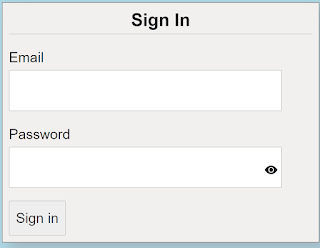
When you think about it, application sign-in forms would seem fairly straight forward and simple to do, considering that most applications have them. Make a form, add a couple of labels and inputs with a button and you are good to go. When you stop and think about it though, there is a lot that goes into making a good sign in form. We are going to take a look at 5 best practices you can use when creating your next sign-in form. The key concept to keep in mind is to make it simple. You have to always consider that your users are not as computer savvy as you are. The sample project that focuses on the sign-in form HTML and Blaozr code. There is no real authentication for the application. Any email and password, that meets the validation, will allow the user to get to the home section of the application. Please note this code will work on either server-side Blaozr of web assembly Blazor We will look at each of the 5 best practice...