Posts

Showing posts with the label UI Componet Library

Modern HTML Replaced Your UI Framework (You Just Didn’t Notice)

Image
You Don’t Need a UI Framework Anymore Modern HTML & CSS Are the UI Library For years, the default answer to “How do I build a UI?” has been: Use React Use Angular Use a component library like Telerik, MUI, or Bootstrap That advice made sense 10 years ago . It makes far less sense today. Modern HTML and CSS have quietly absorbed huge portions of what UI frameworks used to justify themselves for — and most teams haven’t noticed. This post shows how far plain HTML + CSS has come, how much payload you can avoid , and why building a native, framework-agnostic UI library is now not only possible — but often the better architectural choice. This is a continuation of a previous post, Beyond AI: Why HTML Elements Still Boost Productivity in Blazor The Hidden Cost of “Just Use a Framework” Before we even look at code, let’s talk about downloads . Typical UI stack sizes (approximate, min+gzip) Stack Download Size React + React DOM ~120–150 KB React + common UI libs 300–600 K...
Datetime Blazor Component with dynamic Styling

Image
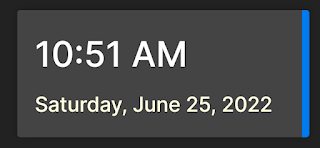
  I wanted to build a component that would utilize a dynamic class for styling.  I came across a nice component that displays the date and time and this post is how I created a Blazor component from it that uses a dynamic style.  We want to be able to do this so we are not changing the component code everything we using.  This is very helpful if the component is part of a UI library. The code in this post was built on .Net 6 using Visual Studio 2022 Project break down Basic control The first step was to just build the control as part of a regular page.  The index page was used.  The HTML is fairly straight forward:           <div class="datetime">                <div class="time">@DateTime.Now.ToShortTimeString()</div>                <div class="date">@DateTime.Now.ToLongDateString()</div>      ...

Blazor User profile component

Image
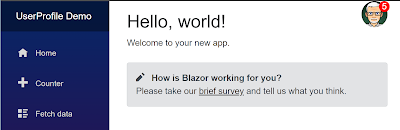
I have always found the UI control that allows a user to manage their profile and preferences to be useful and pretty cool. In this project, I have built this type of control in Blazor.  I think it turned out pretty nice if I say to myself. The main feature I was looking for was just a visual UI that once clicked on, would allow the user to perform some standard actions like managing their profile settings, their application preferences,  getting help, and even logging out. As I started designing the control, I realized that building in all the functionality for the actions would be overkill and make it hard to customize.  I solved this by making a collection of actions that can be passed in as a parameter to the control.  Each action has a link to its own page, a link to the icon image, and a title.  This makes it a lot more reusable.   List of Actions Alerts If the application I am using this in has internal alerts or notifications, I wanted the feat...

How to create a Banner in Blazor

Image
  I found another small control I wanted to include in my UI component library.  It is a banner control that you can place on the top of a page.  The banner can be used to alert the user to take action, to let the user know about a system issue, or even to use ads. On the initial page load, we display the banner with its messaging.  We provide a close button to allow the user to dismiss, as shown in the image above. HTML and CSS The HTML is just a couple of divs and some text.          <div class="banner">          <div class="banner__content">            <div class="banner__text">              <strong>Reminder:</strong> Coding with David is fun and exciting            </div>            <button class="banner__close" type="button">     ...

Blazor UI Component Library

Image
 I was reviewing some sample code the other day and I noticed that the index.html file had a lot of linked CSS files.  This got me thinking: "Question: If UI components are in separate assemblies and use CSS isolation, would you still need to include the CSS file?" The short answer is NO.  if you use CSS isolation, you don't need to include the CSS files. We can go from this: <link href="ComponentLibCSS.styles.css" rel="stylesheet" /> <link href="/_content/Assembly1/styles.css" rel="stylesheet" /> <link href="/_content/Assembly2/styles.css" rel="stylesheet" /> <link href="/_content/Assembly3/styles.css" rel="stylesheet" /> <link href="/_content/Assembly4/styles.css" rel="stylesheet" /> To just this: <link href="ComponentLibCSS.styles.css" rel="stylesheet" /> A key point to remember for this you must be on .Net 5 or gre...
