Posts

Blazor Basic Auth in Docker

Image
The Project Be able to create and deploy a Blazor Server application using Basic Authentication with a local DB.  I want to be able to deploy the application and the database together.  The Why I create a lot of small Blazor applications, less than 1000 users, that need to have authentication and are cheap to deploy.  Up to this point, I have been using Azure SQL Server.  It is costing me $5.00 - $20.00 per month.  I was looking for a way to cut the cost even more. The Solution So my great idea was to build the Blazor Server application with the basic authentication running the SQL Express database edition. In theory, this sounds very doable,  but in reality, there were several hurdles that I did not think of going into building this solution. I will start by explaining the solution I built and then the problems I ran into. The Solution Build  1. Create a Blazor Server Side application with basic Authentication     a. Select to use Docker and...

Blazor Slide Show Presenter

Image
  This is a simple project that shows how to create a slide show presenter in Blazor.   Most of the work is done in the CSS.  Applying some Blazor goodness to it elevates the application. Creating a static slide show presentation is fairly straightforward.  You can create the meat of the presentation in HTML within the Blazor page.  Nothing to fancy about that.   To make things more interesting, we will show how to handle dynamic content in the presentation.  This will allow you to load the content on startup that could be pulled from any other source, API, Database, etc. You step between pages using the arrow keys, ↑ ↓. HTML / CSS As I stated HTML and CSS are the heart of the display.  You can see this on the index page. HTML         <section>             <h1>title 1</h1>         </section> CSS      ...

Blazor User profile component

Image
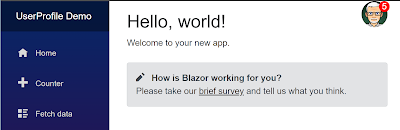
I have always found the UI control that allows a user to manage their profile and preferences to be useful and pretty cool. In this project, I have built this type of control in Blazor.  I think it turned out pretty nice if I say to myself. The main feature I was looking for was just a visual UI that once clicked on, would allow the user to perform some standard actions like managing their profile settings, their application preferences,  getting help, and even logging out. As I started designing the control, I realized that building in all the functionality for the actions would be overkill and make it hard to customize.  I solved this by making a collection of actions that can be passed in as a parameter to the control.  Each action has a link to its own page, a link to the icon image, and a title.  This makes it a lot more reusable.   List of Actions Alerts If the application I am using this in has internal alerts or notifications, I wanted the feat...

Cool new Sidebar navigation for Blazor Applications

Image
 I have been working with Blazor since 2019.  My first Blazor application did not even use a template.  But the templates were provided shortly after, which were very much welcomed.  When I first starting using the template, I thought it was a good template, nice colors and the nav was good too.   I have created a lot of Blazor applications,  the current template is starting to look redundant to me.  Plus all other simple Blazor applications have a similar look and feel.  So I figured it was time to generate my own.  This post is the first one I created. I looked around and found several navigations I like, but none of them had all the feature I was wanted.   This is my version of a navigation bar that has the features I was looking for.  I did struggle with what if any UI kit to use.  More on that in an upcoming blog post.  Spoiler alert, I did not use any. Key Features Nice header Left sided nav bar Sidebar tha...

My first Cosmos DB application

Image
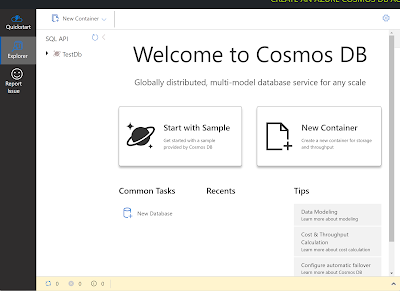
NOTE: This applies to .Net 6.0 Only   I have continued to keep an eye out for a quick and easy database access layer database for use with my test projects and my blog projects.  I thought I had found one with SupaBase, but I quickly ran into limitations with the free version.  Mainly the number of databases you can have (2).  So I am back with another find. I will be trying the free tier of the Azure Cosmos database.  Microsoft announced a free version of Cosmos about a month ago.  Then with .Net 6, they added support for EntityFramework and Cosmos DB. The free tier does have some limitations of course: 1. Only 1 free tier DB per subscription 2. Upto 1000 RUs 3. Upto 25 containers.  All the containers pull from the same 1000 RUs 4. No free tier for serverless  Any free DB system will have limitations, these seem acceptable thus far. Project to build We will be building a simple sample application that will just add records to the cosmos DB. ...

Blazor Wizard Step Component

Image
 I like using step wizards in my applications, sign-up forms, shopping cart checkout, and complex data entry, but I had not been able to find a wizard step indicator that I liked so I built this one. As it turned out, it was not as hard as I thought it would have been.  There are a couple of key parts you have to keep in mind when using a step wizard, such as: 1. What step am I on? 2. Should the "Prev" / "Next" buttons be enabled or disabled on this step? 3. What kind of visual clues do I show the user? I will walk you through how we answer these questions in this sample project.   HTML The main container has a div that holds the progress divs, one div for each "step" of your process.  Below that we have our "Prev" and "Next" buttons We will need to wire in the on-click events for the two buttons.  The buttons will need to be able to be disabled and enabled via CSS class settings.           <div class="container">   ...

Blazor Movie App

Image
  I came across a fun application that provides a list of current movies, provides an overview of the movie, allows the user to search for a title, and shows a color-coded rating from IMDB.  I thought it would be cool to build in Blazor.  I was right it was cool to build. HTML The HTML contains a container div that has a header and main section.   The header is for the search component.  The main section contains a for loop that spins through a collection of movies and builds out the data.  It has an image element, a div that holds an H3 for the movie title, and a span for the IMDB rating. That's pretty much all you need. CSS The CSS is just as straightforward.  We set the background color,  set the location and sizing of the "movie card" and the movie "data". We use a transformation on the movie card so when the user hovers over the movie image we see the data details.  This is a nice visual effect. The one extra styling we do is to col...