Posts

What I learned this week

Image
 One of the great things I like about the software development profession is that you can never learn everything and there's always something new to learn.  I started thinking that I needed to keep track of the new things I learned.  I decided I'm going to start posting every time I have three or four new things that I have learned.  I normally have a goal trying to learn at least one new thing per day, some days it's hard some days it's easy to get more than a few.  I have multiple sources that I use to learn new fun and exciting things from social media, blogs, virtual conferences, YouTube and news do company events.  For this week I have learned how to make the background of an image transparent, how to get a color palette from an image, and that there is a difference in Blazor JSON serialization.  Transparent Image To be able to make an image with a transparent background you need a software package that will remove the background color.  Ther...

.Net 5.0 Blazor Goodness

Image
  With the release of .Net 5.0 quickly approaching it is time to take a look and see what kind of goodies are include for Blazor. .Net 5.0 is aimed at unifying the .Net platform by commuting all the different aspects of the platform into a single release set.  But they have including a lot of upgrades and new features for Blazor.  To see these new features you have to be using at least Visual Studio 2019 16.8 Preview 3 and have .Net 5.0 install on your machine. Here are the new features that I have found exciting.  See the linked source code to see them in action. CSS isolation Input Radio Component UI Focus Support File Input Component On-toggle Event Support  CSS Isolation With this feature, you can now include separate style sheets that are scoped just for your components.  This will allow you to provide the styling you want for your component libraries or just your individual component. This is implemented by convention.  You provide a CSS file nam...

Sign In best practices, Blazor Style

Image
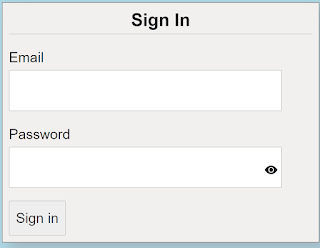
  When you think about it, application sign-in forms would seem fairly straight forward and simple to do, considering that most applications have them.  Make a form, add a couple of labels and inputs with a button and you are good to go. When you stop and think about it though, there is a lot that goes into making a good sign in form.  We are going to take a look at 5 best practices you can use when creating your next sign-in form.  The key concept to keep in mind is to make it simple.  You have to always consider that your users are not as computer savvy as you are.   The sample project that focuses on the sign-in form HTML and Blaozr code.  There is no real authentication for the application.  Any email and password, that meets the validation, will allow the user to get to the home section of the application.  Please note this code will work on either server-side Blaozr of web assembly Blazor We will look at each of the 5 best practice...

Blazor Hosting Cost Analyst

Image
  I have spent some time looking at if Server-Side Blazor App is better than the Client-Side Blazor App, Blazor Hosting Models  post.  I decided to look at it from a cost position and see if there is any benefit of one way over the other.   I took a simple Blazor Application that I wrote Inspirational Quotes  and create both a server-side application and a client-side application.  I then deployed each.  For the server-side application, I deployed as an Azure app service, free trier.  For the cient-side application, I deployed that with Azure blob storage statice web site.  The goal was to just focus on the cost of each deployment. After the deployment I had several users access each web site several times a day.  This was to simulate a light usage, such as a sample app from a blog or portfolio would get.  I monitored the sites for 30 days. Actual Cost I was a little surprised to see the cost for each deployment and utilization...

1 Line CSS Positioning Blazor Style

Image
I found a really good YouTube video  from Google Chrome Developer channel that I am piggybacking off of for this post.  I found the content very interesting and I wanted to see what it would take to first port it s Blazzor application, then how to implement the layouts in a Blazor component library where I can use them in any project.   Please note, even though I am a fan of Bootstrap and other CSS frameworks, I have been on a push lately to write my own CSS.  These layouts are pure HTML and CSS. I won't cover the details of the 10 different layouts and the 1 kay line that makes them work, I do highly recommend you watch the video, it is very educational on CSS layouts. To demonstrate the 10 layouts, I have created a razor page to display the layout.  You can review the source code provided for the details 10 Layouts: 1. Center - All child content is centered within the parent container                     ...

Product Release

Image
I have been building and releasing commercial software for or 30 years now.  I have seen some really good releases and some really bad releases.   By release, I am not talking about clicking the check-in button and having to push to production.  I am talking about releasing a brand new product or a major release of an existing one.  These types of releases require a cross-functional team that is empowered to execute the tasks that are needed to make the publishing a new product or a major release a success. The first 20 years of releasing products were more of an art than science.  Luckily in the last 10 years launching products has developed into a logical process with built-in checks and balances. In the early years, I can remember sitting in a room the day of the release and being asked     "How do you feel about the release?" "How many teams can we have work non-stop to get this done on time?"   And my all-time favorite    ...

1st step is to admit you have a problem

Image
I normally don't like to use the term "problem".  I prefer to see it as an opportunity or a "challenge".  Even when reporting a bug, I prefer to see it as a "coding opportunity". I think I do have a problem, though.  I gave up watching TV.  I am down from about 6 hours to about 1 hour a day.  That is a very good thing.  What I have replaced it with might be just as bad. It started out with good intension.  I wanted to improve my CSS skills.   I have had a PluralSight subscription for years and I use it often.  For my CSS skill upgrade, I was looking for a very specific Flexbox and  CSS Grid content.  PluralSight was overkill for this.   So I turned to YouTube ! I had been on youtube for music, how-tos, and animal videos, but not really for technology videos.  Once I searched for Flexbox, I found a treasure troll of great contact, all free. What I did learn was to watch a vary of different presentations on the sam...