Posts

Jumped feet first with Blazor and TailwindCss

Image
   I watched an incredibly good presentation by Chris Sanity on using Tailwindcss with Blazor. Chris had it look so quick and easy. I was so impressed that I decided right then I had to learn how to use it. This post is about the experience that I went through to learn Tailwindcss and whether I still think it is worth the effort. Spoiler Alert:   It is very worth it.   So, to show that I could use Tailwindcss on a real application, I took the standard Blazor Server template and created an application. There are three pages, Index, Counter, and Fetch Data. I then removed all references to Bootstrap. I wanted to start with just the HTML code. I have broken this post out into "Lessons Learned", "Pros and Cons" and "Style changes I made between Bootstrap and Tailwindcss.    Lessons Learned If you do not understand native CSS, you should not use Tailwindcss. Since Tailwindcss is a set of utility classes, you must understand the und...


The Bestest Browser Dev Tool

Image
  I was recently working on a new application and I was researching different color schemes.   In the past I have used the browser dev tools to see what colors I web site I like was using.  I would get the usual display of a list of colors.   Once you are in Dev tools, you select the "Elements" tab top of the screen.  Then select "Styles" on the right side panel.  This will show a wide range of colors and style used on the web site.  This works, but you basically have to inspect each separate element and take note of the color and font used.  Time consuming, but it will get the job done. I was following this process in several different browsers, Chrome, Edge and Vivaldi, I often use multiple browsers, when I came across a new tool in Edge. I was in Edge, Version 103.0.1264.62 (Official build) when I noticed a new tab: It does show this as an experimental feature.  I clicked on it and I was amazed with what it showed. If you no...

Updating Common Library

Image
I have had a project I call "CommonLib" that I have been using with my .Net projects since before .Net 1.0 was released.  It started out as a collection of helper functions for algorithms and functions that were missing from the .Net system. With new long term support version of .Net, I try to upgrade the library by removing any outdated functions and any functions now supported by the new .Net release.  I update any existing functions with new or improved methods from the .Net system, like pattern matching.  I will add any new features from the new .Net release that meet the requirements to be included in the common library. Changes made for this Release Changes made with this latest release 1. Upgrade to .Net 6 2. Switch to Global Using 3. Turned Nullable support on 4. Removed outdated and duplicate functions 5. Increment the version 6. Updated the assembly properties Common Lib Requirements The requirement to have a function placed in the common lib is:    ...

Datetime Blazor Component with dynamic Styling

Image
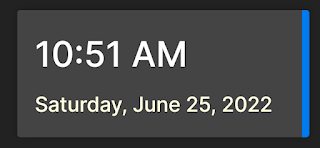
  I wanted to build a component that would utilize a dynamic class for styling.  I came across a nice component that displays the date and time and this post is how I created a Blazor component from it that uses a dynamic style.  We want to be able to do this so we are not changing the component code everything we using.  This is very helpful if the component is part of a UI library. The code in this post was built on .Net 6 using Visual Studio 2022 Project break down Basic control The first step was to just build the control as part of a regular page.  The index page was used.  The HTML is fairly straight forward:           <div class="datetime">                <div class="time">@DateTime.Now.ToShortTimeString()</div>                <div class="date">@DateTime.Now.ToLongDateString()</div>      ...

SQLite Setup

Image
This is a simple post about how to add and use SQLite to your project.  We will be adding Sqlite to a console app to start with.   We will cover: Why SQLite Add Sqlite Adding the tools needed Create database Making schema changes Apply schema changes Why SQLite SQLite is a free lightweight single-file database that requires no engine.  For its size, it is a great choice for mobile, desktop, and small to medium web applications (SQLite) .  If you are running a large web application or need to support complex joins or queries, this is not the database you want to use. SQLite has an entity framework provider, so all data access is the same as any entity framework application.  Another strong point was using it. For the Blazor applications that I blog about, it is a perfect choice. Defined Project We will be building a simple app to showcase SQLite.  Our model will be a Blog Post:          public class Post      ...

Moving Past simple tutorials

Image
The Plan I have enjoyed the simple examples and solutions I was been building and blogging about.  I have a list of 10-15 full size projects that I want to build and use.  Some examples of these projects include Stock watching, note taker and book reviewer.  I know I can find free and open source applications I could use for these, but I want to build and customize them for my needs.   I decided it is time to treat these projects like a true professional projects.  In doing so, I want to share that experience.  A "professional" project means different things to different people.  My definition is to look at this as if I am the one paying for the creation of these projects.  That means, they need to be clean, maintainable, secure and customizable. The only thing missing from the "professional" part is a timeline.  I have always said you can have it fast, right or good, pick 2.  We are going with right and good. The Why I have started...

Blazor Basic Auth in Docker

Image
The Project Be able to create and deploy a Blazor Server application using Basic Authentication with a local DB.  I want to be able to deploy the application and the database together.  The Why I create a lot of small Blazor applications, less than 1000 users, that need to have authentication and are cheap to deploy.  Up to this point, I have been using Azure SQL Server.  It is costing me $5.00 - $20.00 per month.  I was looking for a way to cut the cost even more. The Solution So my great idea was to build the Blazor Server application with the basic authentication running the SQL Express database edition. In theory, this sounds very doable,  but in reality, there were several hurdles that I did not think of going into building this solution. I will start by explaining the solution I built and then the problems I ran into. The Solution Build  1. Create a Blazor Server Side application with basic Authentication     a. Select to use Docker and...